AI Cloud Architect — security at generation time
A–F Security Grade on Every Architecture
Security runs at generation time. Every architecture is scanned against a policy library, scored A–F, and hardened automatically. Findings appear when the code is ready, with inline fixes available.
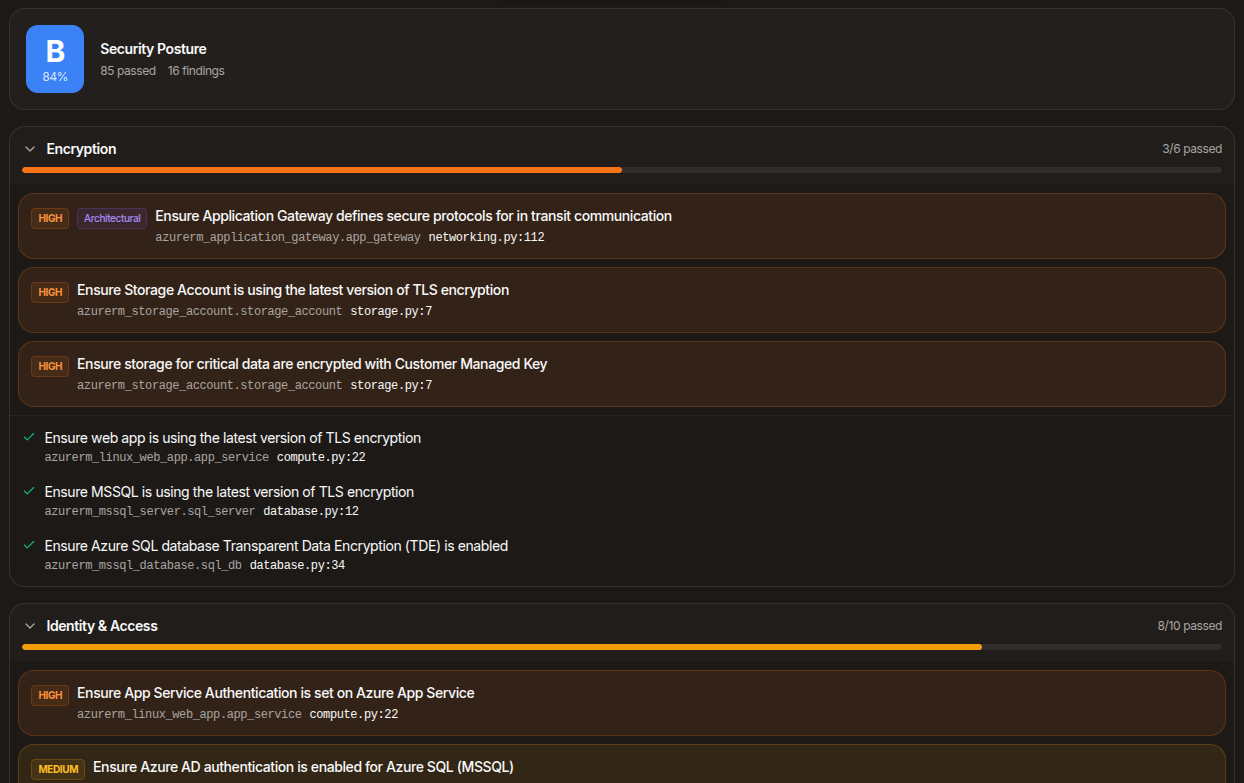
Policy library, applied automatically
The scanner runs against a policy library covering CIS, NIST, and HIPAA-aligned controls — encryption at rest and in transit, public-access blocks, audit logging, network isolation, identity least-privilege, key management, deletion protection, secret handling, and many more. Every check is mapped to the resource type and provider, so each finding identifies the specific resource at fault.
Coverage spans Terraform, Pulumi (TypeScript and Python), and Bicep. Pulumi findings map back to the original Pulumi files and lines, so the line-number you click is the line-number in your code.
Scored posture report
Findings are grouped by category — encryption, network, identity, logging, deletion-protection, and so on — with a per-category pass rate and an overall grade from A to F. Categories with no issues collapse out of the way; categories that need attention expand by default. The display surfaces what needs review.
Automatic security hardening runs at generation time, before the scan. The grade reflects what still needs human judgement after hardening has been applied.
Click a finding, jump to the line
Every finding is clickable. Click the file:line reference and the code editor opens to that line with a persistent highlight, so you can read the context that triggered the finding without losing your place.
Fix-with-AI on every finding
Some findings require architectural decisions automation cannot make for you — pick a customer-managed key, attach a WAF, place a resource behind a private endpoint, scope an IAM policy. For every one of those, Fix-with-AI takes the finding plus the relevant file context and proposes a patch you can review in a diff editor before accepting.
When the fix touches multiple files, the multi-file flow patches every affected file in one pass and shows them as a tabbed diff.
Hardening before the scan
Automatic security hardening covers hundreds of resource types — TLS minimums on storage and load balancers, public-access blocks on buckets, deletion protection on databases, audit logging on key vaults, IMDSv2 on instances, customer-managed encryption companion resources where applicable. This runs before the code reaches you, so the code you see has already been hardened.
Related capabilities
The infrastructure code the security grade scores — Terraform, Pulumi, or Bicep.
Per-resource cost across reserved, spot, and on-demand pricing.
Dashboards, alarms, and notification channels generated alongside your infrastructure code.
Ready to design your next architecture?
Describe, sketch, or upload — diagram, code, security, cost, and docs in one flow.