AI Cloud Architect — know the cost before you build
Cloud Cost Estimator with Per-Resource Breakdown
Every architecture comes with a per-resource cost estimate across AWS, Azure, and Google Cloud — at both list price and after reserved/spot discounts. The savings calculator lets you adjust running hours and pricing model and see the impact instantly, without re-generating the architecture.
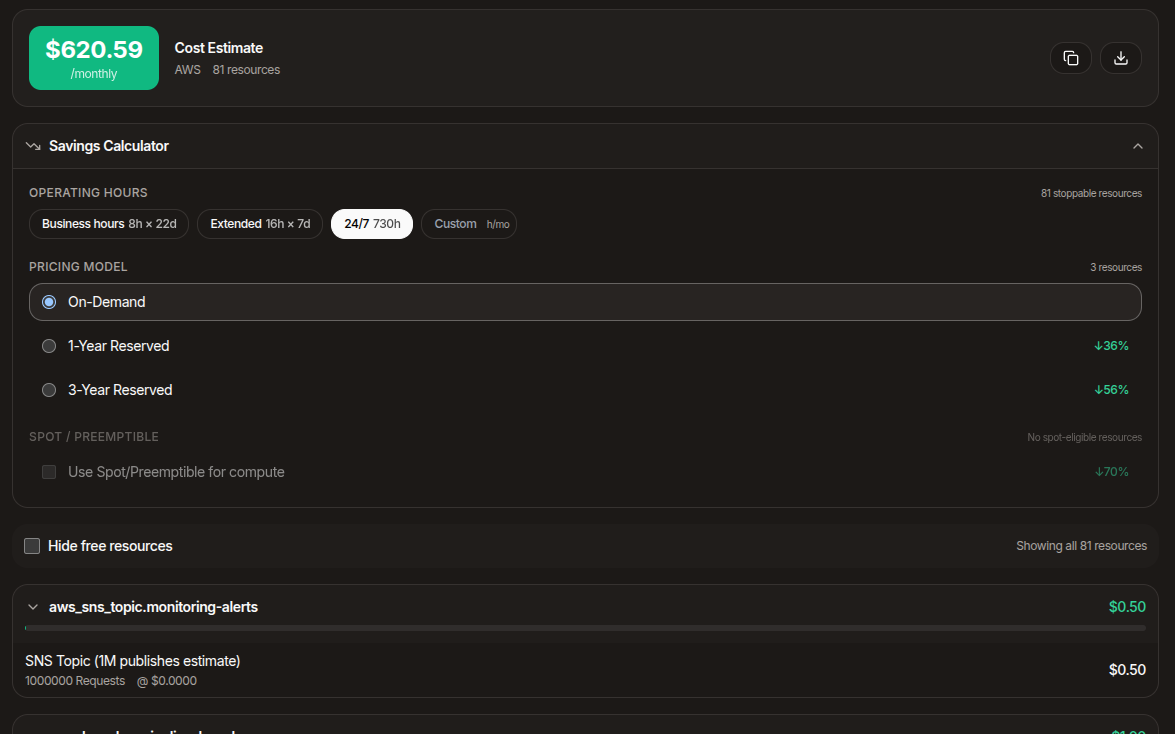
Per-resource breakdown
The estimator breaks down monthly cost by resource — every instance, database, bucket, queue, function, and managed service. You see which resources are driving the bill, with the granularity required for a budget review.
Pricing is sourced from each provider's authoritative pricing catalogues. Where a provider charges per-region, the estimator respects the region declared in your code; where pricing depends on machine type, instance family, or storage tier, the estimator parses the actual configuration in the infrastructure code.
Reserved, spot, and on-demand
The savings calculator shows the same architecture priced at on-demand, 1-year reserved, 3-year reserved, and spot, with the percentage savings labelled against the on-demand baseline. Spot eligibility and reserved eligibility are computed per-resource — non-stoppable resources are excluded from the spot multiplier.
The discount percentages come from each provider's actual pricing database, not blanket estimates. Azure spot rates are pulled from the Azure pricing API; GCP committed-use discounts are pulled from the GCP pricing tables. AWS uses tier-appropriate fallback estimates because the AWS public pricing data does not surface spot/reserved at line-item granularity.
GPU and accelerator pricing
GPU pricing is hard. The catalogues cover hundreds of GPU/accelerator SKUs across AWS (P4/P5, G5/G6, Inferentia, Trainium), Azure (NC, ND, NV families), and GCP (A2/A3, TPU v5e/v5p). Where a SKU is missing from the underlying pricing database, the panel shows an explicit "pricing not yet covered" label, so the gap is visible in the breakdown.
For machine-learning workloads the estimator also surfaces right-sizing suggestions and alternative-accelerator suggestions: switching from P5 to P4d, from H100 to L4, or from GPU to Trainium can change a budget by an order of magnitude.
Hours and what-if scenarios
Real workloads do not run 24/7. The hours selector lets you scale down compute and database costs to dev-hours-only (8 hours × 5 days × 4 weeks) or any other schedule, and the breakdown updates instantly. Storage and bandwidth costs do not scale with running hours and are excluded from the multiplier.
Export the estimate
The cost panel exports as CSV for sharing with finance, attaching to a budget request, or comparing against a competing architecture. The export carries the per-resource breakdown, the pricing model, and the running-hours assumption you used.
Related capabilities
Ready to design your next architecture?
Describe, sketch, or upload — diagram, code, security, cost, and docs in one flow.