AI Cloud Architect — describe, sketch, or upload
AI Architecture Diagram Generator
Turn a natural-language description, a hand-drawn whiteboard photo, or a screenshot of an existing diagram into a clean cloud architecture diagram. Provider-aware service catalogs map every node to a specific managed service across AWS, Azure, and Google Cloud.
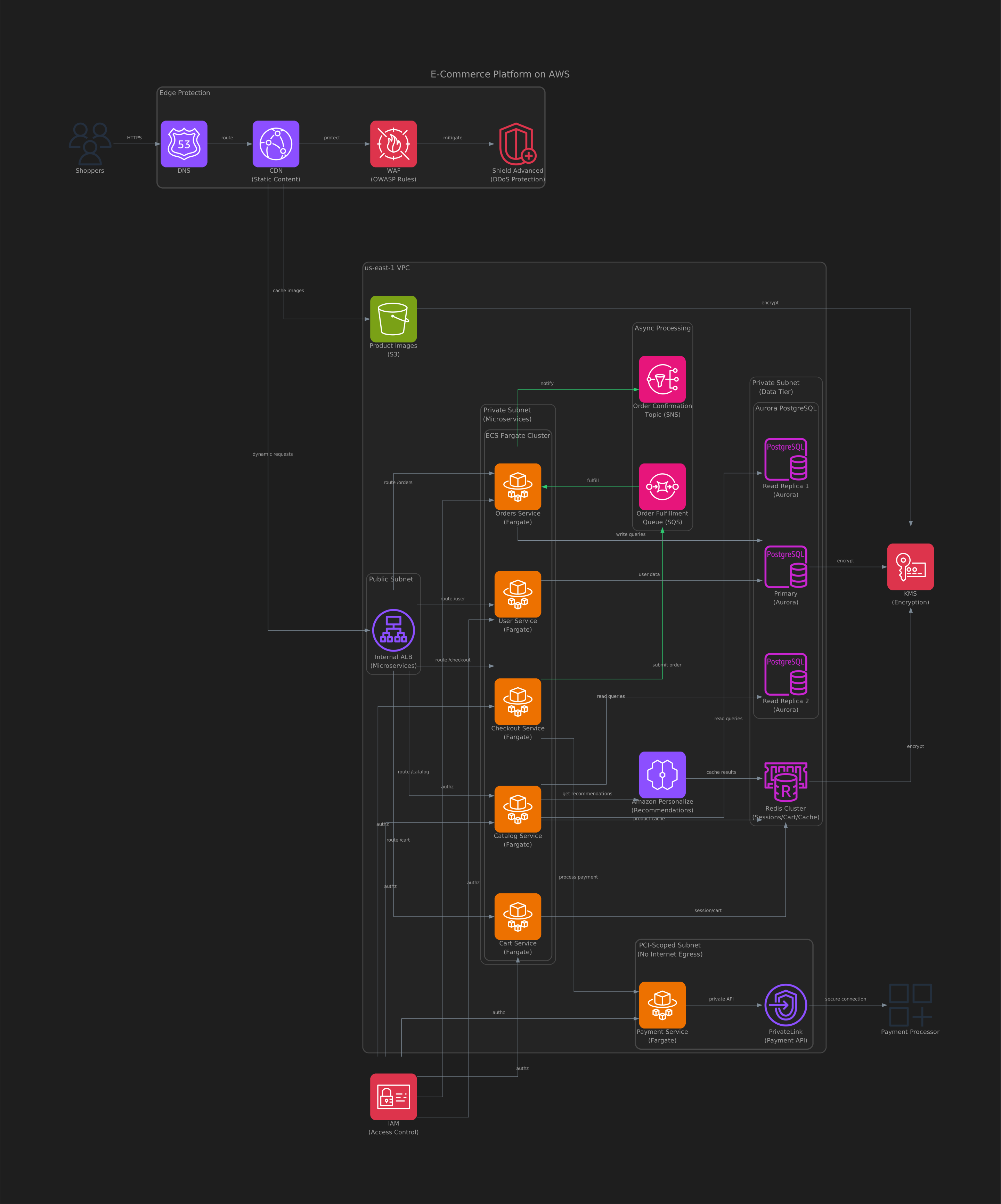
How to start
ArchGenie accepts a range of input modalities. Describe the system in plain English (concise or verbose), sketch it on a whiteboard and upload the photo, drop in a screenshot of an existing reference diagram, or attach a PRD/RFC and let the extractor pull the components and connections out for you. Multi-turn refinement works the same way — keep iterating in conversation until the diagram matches the system you have in mind.
No diagramming tool, YAML schema, or domain-specific language is required — you describe what you want, and ArchGenie turns it into a renderable architecture.
Provider-aware service catalogs
ArchGenie's catalogs map every component to a specific managed service: an "application server" on AWS becomes ECS Fargate or Lambda or EKS depending on the workload; a "managed Postgres" on Google Cloud becomes Cloud SQL or AlloyDB depending on the latency, replication, and budget hints in the request.
The same applies to Azure (App Service, Container Apps, AKS, Postgres Flexible Server, Cosmos DB), and across networking, storage, identity, observability, and AI/ML services. The result is a diagram with provider-specific managed services on every node.
Click any service to refine
Every service node is interactive: click a node to remove it, replace it with a different managed equivalent, add high-availability (multi-AZ, replicas, failover), or jump to its infrastructure code, security findings, or cost line item. The diagram stays in sync with the rest of the solution as you refine.
Iterative refinement: clicking a service triggers a targeted follow-up so the change is surgical. The rest of the diagram, code, and cost stay stable — only the parts that actually depend on what you changed get re-derived.
Imported screenshots and whiteboard photos
Pictures of existing systems are a common starting point — documentation diagrams, conference talk slides, a whiteboard from a design meeting. ArchGenie's extraction step parses the image, identifies the services and connections, asks for confirmation when the cloud provider is ambiguous, and then re-renders the system as a native diagram with provider-specific service nodes. From there you get the same outputs — infrastructure code, a security grade, and cost — as if you had described the system in text.
What happens after the diagram is ready
The diagram is the entry point, not the deliverable. Once it is rendered, the same architecture produces the rest of your outputs: validated infrastructure code in the format you choose (Terraform, Pulumi, or Bicep), an A–F security grade, per-resource cost across reserved/spot/on-demand, observability-as-code, and documentation — all built from the same architecture you see.
Generate an AWS architecture diagram from a description
Describe an AWS system in plain language — "a serverless API with Lambda, API Gateway, and DynamoDB behind an SQS queue", or "a three-tier web app with an Application Load Balancer, ECS Fargate, and RDS Postgres across two Availability Zones" — and ArchGenie maps each component to the right AWS managed service and draws the connections. Compute resolves to Lambda, ECS Fargate, or EKS by workload; data stores resolve to RDS, Aurora, DynamoDB, or ElastiCache; load balancing, IAM, and observability nodes land where they belong.
The AWS diagram is the starting point for the rest of the solution — validated Terraform or Pulumi, an A–F security grade, and a per-resource cost estimate, all built from the same architecture. New to the flow? The step-by-step guide to generating an AWS architecture diagram from a description walks through it end to end.
Azure and Google Cloud architecture diagrams
The same works across clouds. On Azure, components resolve to App Service, Container Apps, AKS, Azure Functions, Postgres Flexible Server, Cosmos DB, and the matching networking and identity services. On Google Cloud, they resolve to Cloud Run, GKE, Cloud Functions, Cloud SQL, AlloyDB, Spanner, and the rest of the managed catalog. Ask for a diagram in any of the three providers, or describe the same system twice to compare how it looks across AWS, Azure, and Google Cloud.
Free to start
You can generate architecture diagrams for free — no credit card. Turn a description, a whiteboard photo, or a screenshot into a diagram, then generate the infrastructure code and review the security grade and cost before deciding on a plan.
Export and share the diagram
Diagrams render as clean SVG you can open full-screen, and every architecture travels with the code it describes: export the whole solution to a GitHub, GitLab, or Bitbucket pull request so the diagram and its infrastructure code stay together — or attach the diagram to a Jira issue to plan the work.
Common questions about the architecture diagram generator
Is there a free AI architecture diagram generator?
Yes. You can start free without a credit card and generate cloud architecture diagrams across AWS, Azure, and Google Cloud, then produce the infrastructure code, security grade, and cost from the same diagram.
Can I generate an architecture diagram from a text description?
Yes — a plain-language description is the primary way to start. Describe the system and ArchGenie renders a provider-specific architecture diagram; keep refining in conversation until it matches what you have in mind.
Can it turn a whiteboard photo or a screenshot into a diagram?
Yes. Upload a photo of a whiteboard or a screenshot of an existing diagram, and ArchGenie identifies the services and connections and re-renders the system as a clean diagram with provider-specific service nodes.
Which cloud providers are supported?
AWS, Azure, and Google Cloud, each with a provider-aware catalog that maps every node to a specific managed service.
Can I get Terraform or Pulumi from the diagram?
Yes. The same architecture generates validated Terraform, Pulumi, or Bicep — along with a security grade, cost estimate, observability, and documentation.
Related capabilities
Validated Terraform, Pulumi, or Bicep generated from the same architecture.
Every architecture gets an A–F security grade with automated hardening.
Per-resource cost across AWS, Azure, and Google Cloud, with reserved vs spot.
Dashboards, alarms, and notification channels generated alongside the code.
Ready to design your next architecture?
Describe, sketch, or upload — diagram, code, security, cost, and docs in one flow.